 how-to
Optimizing Labor Scheduling for Fitness Studios
Table of Contents
- Why Optimizing Labor Scheduling for Fitness Studios Starts With Demand
- Fitness Class Demand Forecasting: Match Staff to Student Demand
- Gym Employee Scheduling: Collect Availability, Assign Shifts, and Cover Gaps
- Fitness Scheduling Software: Tools That Cut Manual Work
- Fitness Studio Labor Costs: Forecast and Track What You Spend
- Contingency Planning for Absences, Waitlists, and No-Shows
- Conclusion: Turn Your Schedule Into a Growth Engine
- Frequently Asked Questions
Last Updated: October 7, 2026
Why Optimizing Labor Scheduling for Fitness Studios Starts With Demand
Optimizing labor scheduling for fitness studios begins with one question: when do members actually show up?
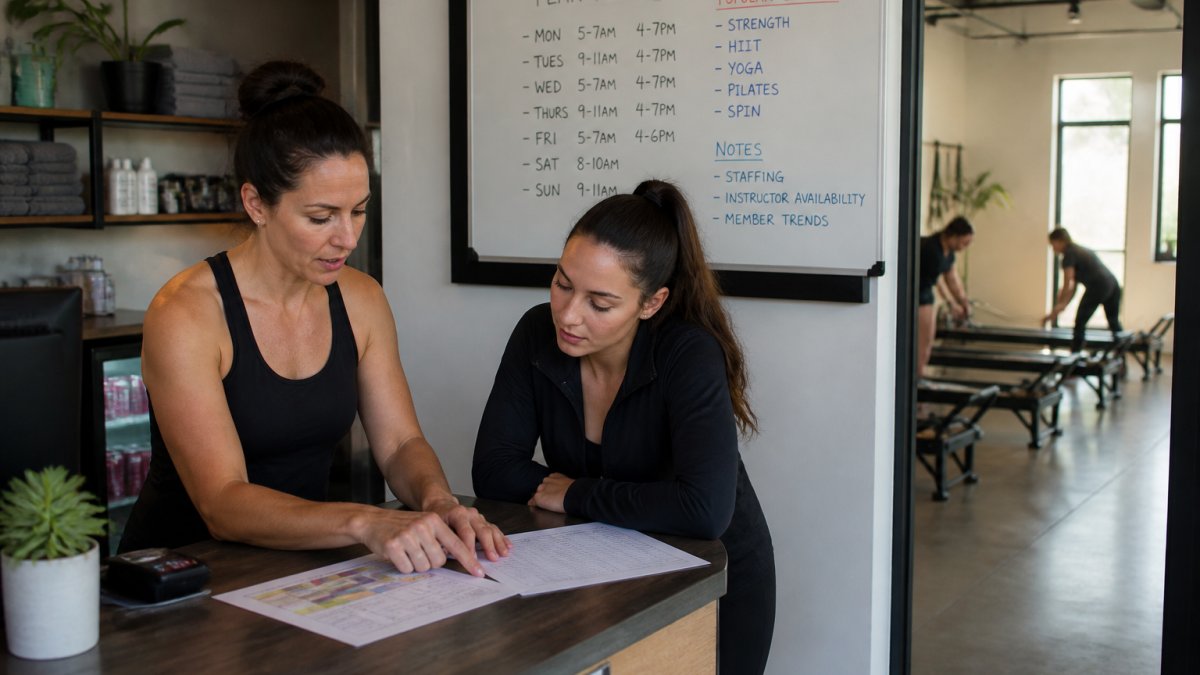
That habit is expensive. Labor is usually a studio's largest controllable cost.
At Scale Partners AI, we've spent 15 years helping wellness operators fix exactly this gap.
Here's the core idea: your class timetable creates your staffing needs. Not the other way around.
- Peak hours need more instructors and front-desk coverage
- Off-peak hours can run lean
- Every shift should tie back to a booking pattern
Get that order right and scheduling stops being guesswork.
Fitness Class Demand Forecasting: Match Staff to Student Demand
Fitness class demand forecasting means predicting how many members will attend each class, then staffing to that number. It turns your class schedule into a staffing plan, and you don't need fancy tools to start, just two weeks of booking data and a simple model.
Build a Simple Forecasting Model
Pull your last 8-12 weeks of class bookings. For each class, note the day, time, and headcount.
Then group classes into three buckets:
- Consistently full: 80%+ of capacity
- Steady: 40-80% of capacity
- Struggling: under 40%
Staff the first bucket generously. Trim the third. Most studios find a handful of classes carry the whole schedule.
Account for Seasonality and Peak Hours
Demand shifts through the year: January rushes, summer slows, and Monday evenings and early mornings spike. Track these patterns for a few months and you'll see your peak and off-peak hours clearly, so you can plan staff around them instead of reacting weekly.
Gym Employee Scheduling: Collect Availability, Assign Shifts, and Cover Gaps
Gym employee scheduling works when three things happen in order: collect availability, assign shifts against demand, and build in coverage for gaps. Skip a step and the schedule breaks.
Set Clear Availability Policies
Vague availability is the root of most schedule chaos. Ask staff for the days and times they can reliably work, a minimum notice window for changes, and how many shifts per week they want. Set a deadline, lock it, then build the schedule from that list.
Assign Instructors and Front-Desk Staff
Match your demand forecast to real people: instructor assignments follow class demand, front-desk coverage follows foot traffic. A simple rule that works, assign your strongest instructors to your fullest classes and keep front-desk coverage heaviest during check-in rushes.
Fitness Scheduling Software: Tools That Cut Manual Work
Fitness scheduling software replaces the spreadsheet-and-text-message routine with a system that handles shifts, swaps, and coverage, cutting hours of manual work each week.
Look for these features:
| Feature | What It Does | Why It Matters |
|---|---|---|
| Availability tracking | Collects staff availability in one place | Ends back-and-forth texts |
| Shift planning | Builds schedules against demand | Matches staff to class bookings |
| Swap and coverage tools | Lets staff trade shifts | Cuts manager firefighting |
| Attendance tracking | Logs who showed up | Shows real class use |
| Reminders | Nudges staff and members | Reduces no-shows |
Booking software that ties into your schedule is even better. When a class fills, your staffing view should reflect it.
Fitness Studio Labor Costs: Forecast and Track What You Spend
Fitness studio labor costs are the total you spend on instructors and front-desk staff. The mistake most operators make is watching that number in isolation, labor cost only means something measured against the revenue and bookings your schedule produces.
Build a Labor-Cost Forecast Before You Build the Schedule
Run the forecast in this order, every week, before you publish shifts:
- Estimate hours needed per role. Use your demand forecast to list instructor hours (class time plus setup, breakdown, and paid admin) and front-desk hours (open, close, and peak check-in windows).
- Multiply by each role's loaded rate. Use the fully loaded hourly cost, base pay plus payroll taxes and benefits, not the sticker wage. A $25/hour instructor is rarely a $25/hour line item.
- Add fixed and semi-fixed labor. Managers, cleaning, and guaranteed minimum hours belong in the forecast even if they don't flex with class demand.
- Compare the total to projected class revenue for the same week, using booking data and average revenue per attendee.
The output is a single ratio: labor cost as a share of revenue. Track it weekly, not monthly. Weekly cadence catches drift before it compounds.
The Schedule-Specific KPIs That Actually Move Margin
Generic payroll reports won't tell you whether your schedule is working. These will:
- Labor cost as a percentage of revenue. Your anchor metric. Compare week over week and against the same week last year, since seasonality distorts month-to-month reads.
- Instructor utilization. Paid instructor hours divided by hours actually teaching. Low utilization means you're paying for idle time between classes or over-long setup windows.
- Paid hours per class. Total paid labor hours divided by classes delivered. This exposes classes that quietly cost more than they earn.
Turn the Numbers Into Schedule Decisions
A KPI is only useful if it changes next week's roster. A few rules of thumb that hold up in practice:
- If labor cost as a share of revenue climbs while bookings are flat, you have a coverage problem, not a pricing problem. Trim off-peak shifts before peak ones.
- If instructor utilization is low but fill rates are high, your problem is class spacing, not headcount. Consolidate the schedule.
- If paid hours per class is high on a specific slot, that slot is a candidate for a shorter class, a combined class, or a different instructor mix.
Where Overtime and Compliance Costs Hide
Overtime is the most common hidden labor cost in studios, usually in two places: front-desk coverage when someone calls out, and instructor hours when a popular class gets a second session without adjusting the rest of the week.
Keep in mind that wage-and-hour rules, overtime thresholds, meal and rest breaks, and how you classify instructors as employees versus independent contractors, are set at the federal level and vary by state and sometimes by city. The U.S.
Contingency Planning for Absences, Waitlists, and No-Shows
Contingency planning keeps your schedule running when reality interferes. Absences, waitlists, and no-shows are normal; chaos isn't. The difference between a studio that absorbs a sick call and one that scrambles is whether the backup procedure was written down beforehand.
Build a Substitute-Instructor Pool by Class Type
A single "backup list" isn't enough. Coverage has to match the class. A yoga substitute can't cover a spin class, and a front-desk sub can't teach either.
Build the pool in tiers:
- Tier 1, Same-format, same-studio instructors who already know the room, the equipment, and the members. These are your first calls.
- Tier 2, Cross-trained instructors who can cover a related format with a modified class. Note which formats they can credibly teach.
- Tier 3, External subs you've vetted and onboarded in advance, with their pay rate and availability already on file.
For each class type, aim for at least two Tier 1 names and one Tier 2 name. If a format has no backup, that's a single point of failure you should fix before the next schedule cycle.
Write the Escalation Rules Down
Ambiguity is what turns a sick call into a crisis. Decide in advance:
- Who calls whom, and in what order. Manager calls Tier 1, then Tier 2, then Tier 3. Set a time limit per tier, for example, 30 minutes per contact before moving on.
- How much notice triggers which response. A call-out 24 hours out is a scheduling task; two hours out is an emergency and should trigger the emergency path immediately.
- Who has authority to cancel a class. If no sub is found, someone needs standing authority to cancel, combine classes, or move members to another time slot, without waiting for approval.
Handle Waitlists So Open Spots Fill Fast
A waitlist is only useful if it converts. Set it up so that:
- Members can join from the booking app, not by texting the front desk.
- When a spot opens, the first person on the list gets an automatic notification with a short claim window, 15 to 30 minutes is common.
- If they don't claim it, the spot rolls to the next person automatically.
This matters for staffing, not just bookings. A class with a long waitlist and a high no-show rate may need a second instructor, or just a tighter claim window. The waitlist data tells you which.
Reduce No-Shows With Policy, Not Just Reminders
Reminders help, but policy does the heavier lifting. A workable no-show policy usually includes:
- A reminder window. A push notification or text a few hours before class cuts empty bikes and mats noticeably.
- A late-cancel cutoff. Members who cancel inside the cutoff window count as a no-show.
- A consequence that's fair but real. Common approaches include a small fee, a temporary booking restriction, or losing waitlist priority. Apply it consistently, inconsistent enforcement erodes trust faster than the policy itself.
Connect Contingency Planning Back to Demand Forecasting
Every absence, waitlist, and no-show is data. Log them by class, day, and time slot. Over a few months, patterns emerge: the 6 a.m.
Those patterns feed back into your demand forecast. If January is busy, staff for it before it hits and deepen your substitute pool to cover extra sessions. If summer slows down, trim off-peak shifts before absences pile up.
Conclusion: Turn Your Schedule Into a Growth Engine
The studios that grow aren't the ones with the most classes. They're the ones whose staff, rooms, and bookings line up every week.
That's the work Scale Partners AI does with wellness operators. We build custom, production-ready systems that fit your existing software, so you get weekly recommendations on staffing, retention, and margins.
Book a Discovery Call and see how better labor scheduling turns your schedule into a growth engine.
Frequently Asked Questions
How can a fitness studio forecast staffing needs for each class?
Start by pulling 8-12 weeks of attendance data from your booking software to find average class size by day and time. Build a simple spreadsheet that multiplies expected attendance by your staff-to-member ratio, then add a buffer for peak hours. Review the forecast weekly and adjust for seasonality, holidays, and new class launches. This demand forecasting approach helps you schedule the right number of instructors and front-desk staff without overstaffing off-peak hours.
Can AI help fitness studios optimize employee schedules?
Yes. AI scheduling tools can analyze historical class bookings, staff availability, and labor cost targets to suggest shift plans that reduce manual work. They flag understaffed peak hours and overstaffed off-peak blocks, and they can automate waitlist and substitute notifications. The goal is not to replace your judgment but to give you a starting schedule you can adjust in minutes instead of hours. Many studios use AI recommendations as a weekly starting point, then fine-tune based on instructor preferences and member feedback.
How can studios reduce labor costs without hurting the member experience?
Focus on matching staff coverage to actual class demand rather than scheduling by habit. Use attendance tracking to identify low-traffic classes where you can combine sessions or shift to a single instructor. Cross-train front-desk staff to cover multiple roles during slower periods. Offer off-peak incentives to members to spread attendance, which lets you keep labor lean without cutting peak-hour service. Track labor cost as a percentage of revenue weekly so you can see the impact of each change.
What data should a fitness studio use to plan staff schedules?
You need four data sets: historical class attendance by time and instructor, employee availability and shift preferences, labor cost per hour by role, and member booking patterns including waitlists and cancellations. Combine these in a simple dashboard or spreadsheet. Review the data weekly to spot trends like a Tuesday 6 p.m. class that consistently waitlists or a Friday noon class that runs at 40% capacity. These signals tell you where to add or reduce staff hours.